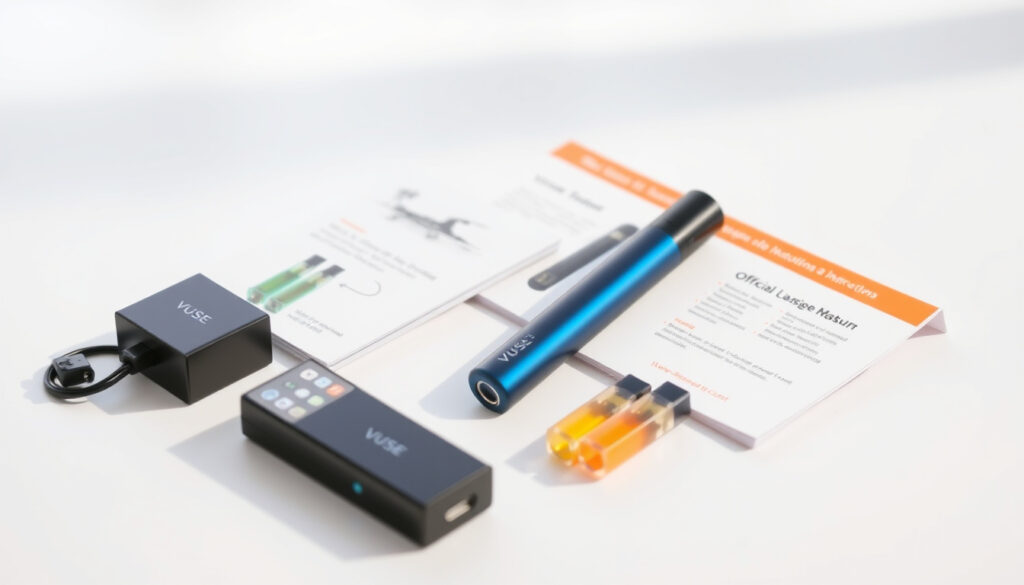
How to Use Vuse ePen 3: Official Step-by-Step Guide
The Vuse ePen 3 requires a straightforward three-click activation and click-in pods that make it easier to use than most vape hardware—but the brand transition from Vype and the button-first firing method trip up many first-time users. This guide walks through every step from unboxing to your first inhale, using official instructions from Vuse and the NHS to keep things accurate.
Whether you’re switching from cigarettes or upgrading from a different vape, here’s how to get started without the guesswork.
Activation Method: 3 quick button presses ·
Pod Insertion: Click into device ·
Power Off: 3 quick button presses ·
Vape Action: Press button while inhaling ·
Brand Variants: Vuse ePen 3 / Vype ePen 3
Quick snapshot
- Insert pod until it clicks (NHS Vype Guide)
- Press button 3 times to power on (Vuse Ireland User Guide)
- Press and hold button while inhaling (180 Smoke Vype FAQ)
- Check pod is firmly seated — press down until click (Parklane Jewelry Fix Guide)
- Re-activate with 3 button presses if device locks (Vuse Canada FAQ)
- Clean contacts with dry cloth or cotton swab (Vape Ecigs Troubleshooting)
- Start with slow, gentle puffs — not deep drags (Vuse Ireland User Guide)
- Monitor how many puffs you take daily (NHS Vype Guide)
- Use only official Vuse pods with this device (Vuse Switzerland FAQ)
- Pods are disposable — do not attempt to refill (EightVape Vuse Guide)
- Orientation matters — align pod correctly before inserting (Parklane Jewelry Fix Guide)
- Wrong pod type triggers error codes 11, 24, or 25 (Vuse Switzerland FAQ)
Four essential facts define the Vuse ePen 3 experience: activation method, power controls, pod system, and the brand transition from Vype. The table below pulls together the key specifications from official sources.
| Specification | Detail | Source |
|---|---|---|
| Device Activation | 3 button presses | Vuse Ireland User Guide |
| Power Off Method | 3 button presses | NHS Vype Guide |
| Pod System | Click-in cartridges (non-refillable) | 180 Smoke Vype FAQ |
| Brand Note | Vuse successor to Vype | 180 Smoke Vype FAQ |
| First Use | Fully charge before initial use | Vuse Ireland User Guide |
| LED Indicator | Shows battery level when activated | Vuse Ireland User Guide |
How to Turn On Vype ePen 3?
The activation process follows a specific button sequence that doubles as a safety feature. According to the official Vuse Ireland ePen User Guide, users insert the pod first, then press the device button three times in quick succession to power on the unit. The same three-click sequence turns the device off, which prevents accidental activation when the vape is stored in a pocket or bag.
First-time setup
- Remove all packaging and check the pod is securely sealed in its blister pack
- Insert the pod into the top of the device, pressing straight down until you hear a click (NHS Vype Guide)
- Charge the device fully before first use — this ensures optimal battery performance during the initial pod
- Press the button three times within two seconds to activate
Button press sequence
The three-click activation serves as a child-safety lock and prevents the device from firing accidentally. Some regional sources mention a five-click alternative for certain markets, but the documented standard from Vuse Ireland and NHS guidance confirms three clicks for on/off control.
Three quick button presses toggle power on or off. This simple sequence works across all regions using official Vuse instructions.
What this means: if your device shows three LED flashes when you try to vape, it is locked. Press the button three times again to unlock it before inhaling.
How to Use Vuse ePen?
Core usage combines pod insertion with button-activated vaping. Unlike the Vuse ePod, which is draw-activated (you simply inhale), the ePen 3 requires holding the firing button while drawing on the mouthpiece.
Inserting the pod
The Vuse ePen 3 uses press-fit pods that click into the top of the device. The NHS Vype ePen Guide (published June 2020) describes the cartridge inserting with an audible click sound. According to 180 Smoke’s Vype FAQ, pod insertion requires pushing in by hand until the connection feels secure.
Inhaling vapor
- Press and hold the firing button before putting your lips on the mouthpiece
- Take a slow, gentle puff — avoid deep drags that can flood the coil
- Release the button before finishing the inhale
- Watch the LED indicator: it confirms the device is active during each puff
What this means: the button-first approach gives you control over vapor production. Beginners should start with short two-second draws and build tolerance gradually.
How to Use a Vuse Vape for Beginners?
The Vuse ePen 3 falls into the closed-system vape category, meaning pods come pre-filled and are disposed of when empty. This design simplifies operation compared to open-tank systems where you refill e-liquid manually.
Pod vapes overview
Closed-system devices like the Vuse ePen 3 suit smokers transitioning to vaping because they require minimal maintenance. Vuse pods are disposable and cannot be refilled, according to the EightVape Vuse Guide. This eliminates the need to handle e-liquid, which many new users find intimidating.
Basic operation
- Click pod into place — alignment matters for proper electrical contact
- Press button three times to power on (wait for LED confirmation)
- Hold button while inhaling through the mouthpiece
- When vapor production drops or flavor tastes burnt, the pod is spent
- Replace with a new official Vuse pod (compatible pods only)
Using third-party or incompatible pods triggers Vuse error codes 11, 24, or 25, which signal pod short circuits, resistance mismatches, or authentication failures. Stick to official pods to avoid these issues.
The catch: closed-system pods cost more per puff than refillable options, but they eliminate mess and guesswork for beginners who just want something that works.
Why is my Vuse ePen Not Working?
Troubleshooting a non-responsive Vuse ePen 3 follows a logical sequence from simplest to most involved fixes. Most issues resolve at the pod or activation stage before requiring deeper intervention.
Common issues
- Pod not activating: Ensure pod is firmly inserted straight down until it clicks — improper orientation causes activation failure (Parklane Jewelry Fix Guide)
- Device locked: Three LED flashes indicate lock mode — press the button three times to unlock (Vuse Canada FAQ)
- No vapor despite button press: Check battery charge — low battery prevents coil heating
- Error Code 11: Pod short circuit — remove pod, clean connections, try a new pod (Vuse Switzerland FAQ)
- Error Code 24: Pod large resistance — clean pod and device contacts, use compatible pod
- Error Code 25: Pod authentication error — reinsert securely or try a different pod
Fix steps
- Clean the metal contacts where the battery meets the pod using a dry cloth or cotton swab
- If buildup is visible, use a cotton swab with rubbing alcohol (Parklane Jewelry recommends this approach)
- For clogged airway holes, use a Q-tip to clear the airflow vents on the pod
- If cleaning does not resolve the issue, try a different pod from your pack to isolate whether the original pod is defective
- Reset the device by removing and reinserting the pod after cleaning
- If troubleshooting fails, contact Vuse customer service rather than forcing the pod or modifying the hardware
Vuse pods are sealed units — attempting to open or refill them risks leaks and device damage. When troubleshooting fails, contact Vuse customer service rather than forcing the pod or modifying the hardware.
How Do I Activate My New Vape Pen?
Initial activation follows the same unlock sequence used for daily operation. The Vuse ePen 3 ships in a locked state as a safety measure, requiring the three-click sequence before the first use.
Unlock sequence
- Insert pod and listen for the click confirmation
- Press the firing button three times within two seconds
- Look for LED indicator — steady glow means device is active
- If light flashes three times, press button three more times to unlock
Initial power on
Per the Vuse Ireland ePen User Guide, fully charge the device before first use. This initial charge conditions the battery for consistent performance throughout the pod lifespan. After charging, the activation sequence becomes routine each time you use the device.
The unlock sequence is identical for activation and deactivation: three quick button presses. New users should practice this motion before the first draw to build muscle memory.
The implication: once you master the three-click sequence, the Vuse ePen 3 requires no learning curve beyond pod replacement.
Confirmed facts vs. What’s unclear
Confirmed facts
- 3 clicks activate the device
- 3 clicks also turn the device off
- Pod clicks into place for proper activation
- Button must be pressed while inhaling
- Vuse pods are disposable and non-refillable
- Official error codes map to specific pod issues
What’s unclear
- Exact puff limits per pod (varies by inhale depth and frequency)
- Battery life in hours or puffs per charge
- Regional pod compatibility differences beyond documented markets
- User-reported success rates for cleaning-based troubleshooting fixes
- Long-term pod degradation timelines under varied storage conditions
- Precise error code reset procedures after pod replacement
What the sources say
Insert the pod into the device. Click 3 times to turn on the device.
— Vuse Ireland (Official User Guide)
The ePen 3 does feature a firing button, which is also used to turn the device on and off with 5 clicks.
— 180 Smoke (Vape Retailer)
Always ensure your pods are stored properly and clean before use to avoid connection issues.
— Vuse Switzerland (Official FAQ)
For new vapers switching from cigarettes, the Vuse ePen 3 eliminates most of the complexity that makes other devices intimidating. The three-click activation, click-in pods, and button-controlled firing give you predictable, repeatable operation once you understand the sequence. The tradeoff is cost — sealed pods cost more per puff than refillable options — but that premium buys simplicity that most beginners actually want. Your first decision is straightforward: insert the pod, press three times, and inhale.
Related reading: Vuse Ireland ePen User Guide · Vype ePen Use Guide (NHS)
Frequently asked questions
How do I insert a pod into Vuse ePen 3?
Align the pod with the top opening and press straight down until you hear a click. The pod should sit flush with the device body. If it wobbles or does not click, remove and reinsert ensuring proper orientation.
What if the button doesn’t respond?
Check whether the device is locked (three flashes = locked). Press the button three times to unlock. If there is no LED response, the battery may be depleted — charge the device before attempting further troubleshooting.
How to know when pod is empty?
Vapor production drops noticeably, flavor tastes burnt or muted, or the LED indicator behaves abnormally. When these signs appear, the pod is spent and should be replaced with a new official Vuse pod.
Can I use Vype pods in Vuse ePen 3?
Vype was the predecessor brand to Vuse. Compatible pods carry Vuse branding. Using third-party or incompatible pods triggers error codes 11, 24, or 25. Always use official Vuse pods with this device.
How to clean Vuse ePen 3?
Wipe the exterior with a dry cloth. Clean metal contacts where the pod meets the battery using a dry cotton swab. For clogged airway vents on pods, use a Q-tip gently. Do not use water on electrical components.
Is Vuse ePen 3 child-locked?
The three-click activation sequence acts as a safety lock preventing accidental activation. Store pods and devices out of reach of children. The device does not have a separate parental control code.
What nicotine strengths are available?
Vuse pods come in multiple nicotine strengths, typically ranging from 0% (nicotine-free) to 1.8% (18 mg/ml). Availability varies by region. Check official Vuse product listings for your local market’s options.
More related posts
 Cast of The Walsh Sisters: Actors and Characters List
 Income Protection Insurance Ireland: Is It Worth the Cost?
 The Revenge Club Cast: Complete Guide to the 2025 Thriller
 Natural Hot Springs in North Iceland: A Complete Guide
 How to Speed Up Metabolism Naturally: Science-Backed Tips
 Maximum Liquid Carry-On Airplane Ryanair – 100ml Rules and Exceptions
 Yahoo Mail Login: Sign In with Password Only
 What Are RevPoints? A Complete Guide to Revolut’s Loyalty Programme
